

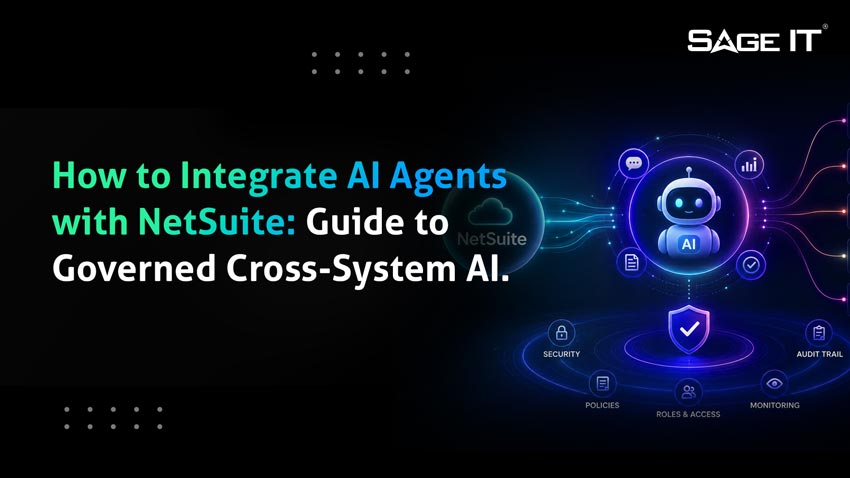
How to Integrate AI Agents with NetSuite
To integrate AI agents with NetSuite, you can use Oracle NetSuite’s AI Connector Service, install the MCP Standard Tools SuiteApp, enable the required SuiteCloud features, configure OAuth 2.0, create a scoped non-Administrator role, and connect an AI client such as Claude, ChatGPT, or another MCP-compatible client to NetSuite’s MCP endpoint. Oracle’s documentation says supported clients must work with remote MCP servers, MCP protocol version 2025-06-18, OAuth 2.0 Authorization Code Grant with PKCE, and streamable HTTP.
That answers the technical setup question.
At Sage IT, we believe the more important question is this:
What happens after the AI agent connects to NetSuite?
Most real business workflows do not live inside NetSuite alone. Order-to-Cash may touch NetSuite, Shopify, Stripe, and a fulfillment system. Customer onboarding may touch HubSpot, NetSuite, Shopify, Stripe, and internal approval workflows. Procure-to-Pay may involve NetSuite, Procore, vendor portals, payment platforms, and integration middleware.
That is why we built NS-AIF, NetSuite Agentic Integration Fabric, our productized Autonomous Cross-System Action Fabric. NS-AIF is designed to help AI agents execute governed business outcomes across NetSuite and connected systems, not just retrieve records from NetSuite. We built NS-AIF around four layers: intent, orchestration, governance, and integration, with pre-built Order-to-Cash and Procure-to-Pay process flows.
In simple terms:
Oracle AI Connector Service = connect an AI client to NetSuite
Sage IT NS-AIF = execute governed business outcomes across NetSuite and the enterprise stack
Quoteable takeaway: Oracle AI Connector Service connects an AI client to NetSuite. Sage IT NS-AIF executes governed business outcomes across NetSuite and the enterprise stack.
How this guide was created
This guide was prepared by Sage IT’s integration practice using Oracle NetSuite product documentation, NIST AI risk-management guidance, and our implementation experience with NS-AIF, NetSuite integrations, O2C, P2P, and governed cross-system workflows. Technical recommendations, product positioning, and implementation guidance are based on Sage IT’s subject-matter review and should be validated against each client’s NetSuite account configuration before production deployment.
Why does connecting the AI agent only solve the first part of the NetSuite problem?
The search query is “how to integrate AI agents with NetSuite.” The straightforward answer is now well defined: use NetSuite’s native AI Connector Service and MCP Standard Tools SuiteApp.
Oracle’s NetSuite AI Connector Service lets external AI clients interact with NetSuite through the Model Context Protocol, while the MCP Standard Tools SuiteApp exposes tools for NetSuite records, reports, saved searches, and SuiteQL queries. These interactions are governed by NetSuite’s role-based security model, meaning the AI client can only access what the assigned role allows.
That is a major step forward.
We see many NetSuite AI initiatives fail to move beyond proof of concept because teams stop at the connection layer. They connect Claude, ChatGPT, or a custom AI client to NetSuite, run a few natural-language SuiteQL queries, and call it an AI agent strategy.
That is not enough for production business value.
A production AI agent must be able to answer questions like:
| Business question | Why a NetSuite-only agent may fall short |
| “Can we onboard this customer?” | The workflow may span CRM, NetSuite, e-commerce, payments, and notifications. |
| “Can we fulfill this order?” | The answer may depend on Shopify, NetSuite inventory, payment authorization, and warehouse status. |
| “Can we reconcile this revenue mismatch?” | Orders, payments, and revenue schedules may live in different systems. |
| “Can we resolve this vendor invoice exception?” | The agent may need NetSuite, procurement records, vendor data, approvals, and payment workflows. |
This is where NS-AIF becomes our architectural answer.
What is Sage IT’s NS-AIF?
NS-AIF, or NetSuite Agentic Integration Fabric, is our productized framework for deploying AI agents across NetSuite-centered enterprise environments.
It is not just another connector. It is not a wrapper around NetSuite’s AI Connector Service. It is a governed agentic integration layer that sits above NetSuite and connected systems to execute business intent across the enterprise stack.
We built NS-AIF around four layers:
| NS-AIF layer | What it does |
| Intent layer | Understands the business objective, such as “create this customer and set up payment.” |
| Orchestration layer | Breaks that objective into system-specific actions across NetSuite and connected platforms. |
| Governance layer | Applies role-based access control, approval gates, human-in-loop policies, and audit trails. |
| Integration layer | Handles APIs, OAuth, retries, data transformations, system-specific contracts, and error handling. |
This architecture reflects our core position: AI agents should not simply automate tasks inside one system. They should execute business outcomes across systems with governance, context, and auditability. We define this as the difference between traditional iPaaS workflow orchestration and Autonomous Business Intent Execution.
What changes when AI agents are integrated with cloud ERP systems?
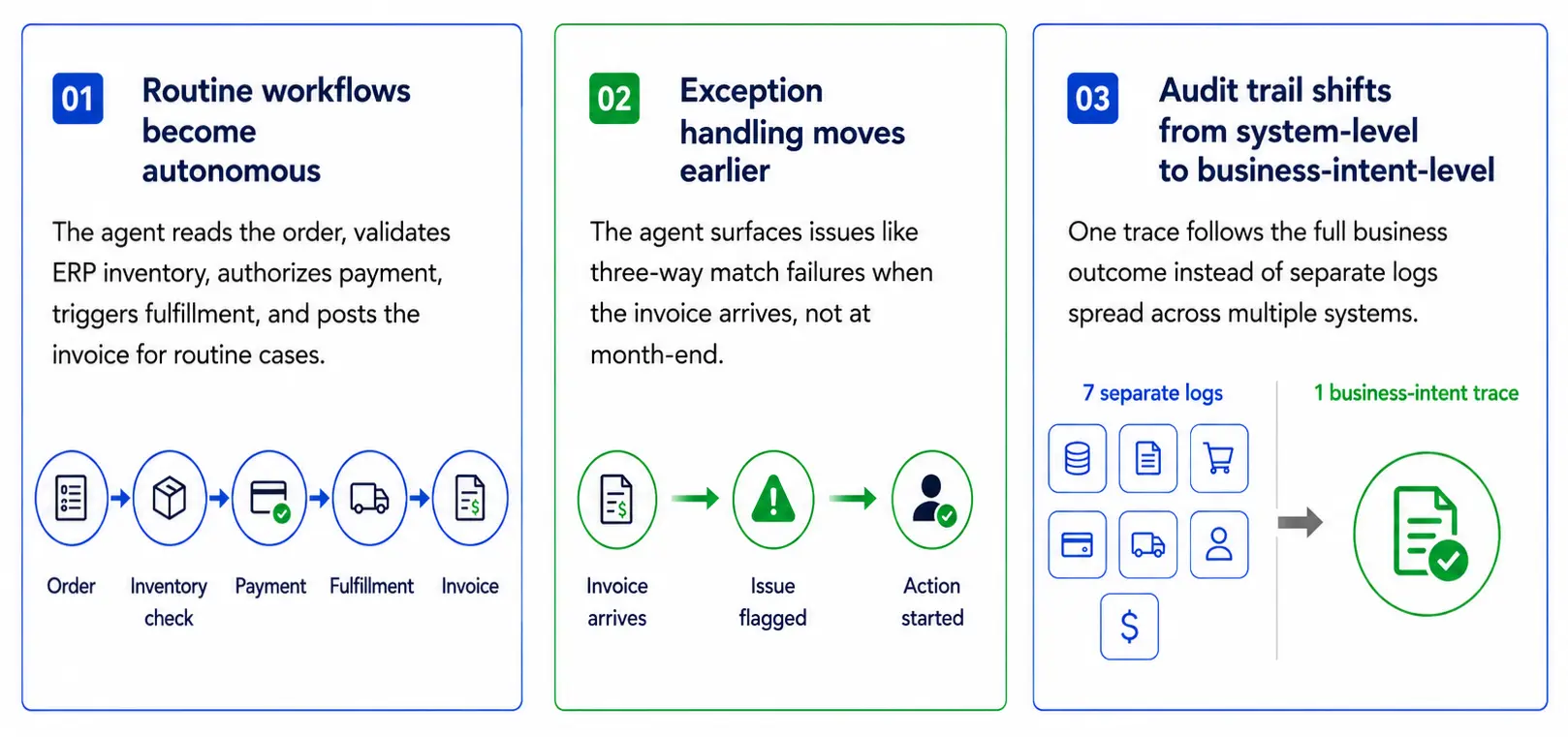
Three things change, and they compound. First, workflows that previously required a human to move data between the ERP and the connected systems become autonomous: the agent reads the order in the e-commerce system, validates inventory in the ERP, authorizes payment, triggers fulfillment, and posts the invoice without a human in the loop on the routine cases. The Hackett Group’s 2025 Digital World Class Finance research found that top-performing finance organizations operate at 45% lower cost as a percentage of revenue and reach 80% automation in accounts payable workflows. Second, exception handling moves earlier in the cycle: the agent surfaces a three-way match failure the day the invoice arrives rather than at month-end. Ardent Partners’ 2024 State of ePayables survey found 31% of AP teams already use AI in some form, with the most effective deployments combining capture and resolution. Third, the audit trail becomes business-intent-level rather than system-level: one trace per business outcome instead of seven separate logs across seven systems.
Why don’t most AI deployments deliver business value?
Because most are bolted-on copilots, not architectural shifts. McKinsey’s June 2025 report Seizing the Agentic AI Advantage found that 78% of companies use generative AI in at least one business function, yet more than 80% report no material contribution to earnings from those initiatives. MIT Project NANDA’s State of AI in Business 2025 puts the same point harder: of organizations that evaluated enterprise AI tools, only 5% reached production. The difference between the 5% and the rest is not the model. It is whether the deployment is a horizontal copilot bolted onto a single system, or a vertical agentic capability embedded in the workflows that cross system boundaries. Cross-system integration is the architectural pattern that moves the deployment from proof of concept to business value.
Quoteable takeaway: Eighty percent of generative AI deployments report no material earnings impact. Five percent reach production. The difference is architecture, not model.
How does this apply if I am on a cloud ERP other than NetSuite?
This guide focuses on NetSuite because that is where our NS-AIF practice operates. The architectural principles, scoped connection layer, least-privilege role, OAuth-based authentication, and orchestration layer above the ERP for cross-system workflows, apply broadly across modern cloud ERPs, though the specific connector and vendor offerings differ. If you are not on NetSuite, the framework here may still inform your reference architecture, even if the implementation path requires a different vendor.
What is the difference between native NetSuite AI integration and Sage IT NS-AIF?
Oracle’s AI Connector Service is valuable. We recommend it as the right foundation for many NetSuite AI initiatives.
But it answers a narrower question:
“How does an AI client access NetSuite?”
NS-AIF answers the broader enterprise question:
“How does an AI agent execute a governed business workflow across NetSuite and every other system involved?”
| Capability | Oracle NetSuite AI Connector Service | Sage IT NS-AIF |
| Primary purpose | Connect an AI client to NetSuite | Orchestrate business outcomes across systems |
| Scope | NetSuite records, reports, saved searches, SuiteQL, and tools | NetSuite plus connected systems such as e-commerce, CRM, payments, procurement, project systems, and custom SaaS |
| Governance | NetSuite role-based access | Unified RBAC, approval gates, human-in-loop controls, and cross-system audit trail |
| Best use case | NetSuite-only queries and actions | O2C, P2P, onboarding, reconciliation, and workflows spanning multiple systems |
| Development model | Native tools plus custom MCP/SuiteScript where needed | Pre-built process flows configured for the client environment |
| Our role | Implementation, configuration, custom tools, security design | Productized agentic integration fabric with deployment services |
Oracle’s native path gets the agent into NetSuite. NS-AIF helps the agent work across the business.
Quoteable takeaway: Oracle’s native path gets the agent into NetSuite. NS-AIF helps the agent work across the business.
How do you integrate an AI agent with NetSuite using Oracle’s native path? (Step-by-step guide)
NetSuite AI Native Setup Path
A step-by-step guide for connecting an AI agent to NetSuite using Oracle’s native path.
Choose the first use case
Start narrow and low risk. Good first use cases: SuiteQL, saved search summaries, AP exception triage, month-end close review, customer or vendor lookup.
Enable NetSuite prerequisites
Turn on required features and permissions: Server SuiteScript, REST Web Services, OAuth 2.0, and MCP permissions.
Install MCP Standard Tools
Expose NetSuite tools to the AI client: records, reports, saved searches, and SuiteQL.
Create a scoped AI role
Do not use Administrator. Create a purpose-specific role with least privilege and only approved access.
Connect the AI client
Use OAuth 2.0 to connect Claude, ChatGPT, or another MCP-compatible client using remote MCP, PKCE, and streamable HTTP.
Test before production
Start in sandbox. Validate read-only first, propose-only second, and controlled writes last.
Even when NS-AIF is the broader architecture, the native NetSuite connector path matters because it is often the NetSuite access layer underneath the agentic architecture.
Here is the setup path.
1. What first AI agent use case should you choose for NetSuite?
Start with a narrow workflow. Do not begin with “let AI run finance.” Begin with a bounded use case that has clear value and manageable risk.
Strong first use cases include:
| Use case | Why it works |
| Natural-language SuiteQL | Read-only, easy to validate, useful for finance and operations |
| Saved search summaries | Low risk and valuable for NetSuite users |
| AP exception triage | High manual workload, but can begin in propose-only mode |
| Month-end close review | Strong finance value with human approval |
| Customer or vendor lookup | Simple, role-governed retrieval |
We recommend classifying the use case before selecting the architecture:
2. Which NetSuite features must be enabled for AI agent integration?
Oracle’s setup guidance for NetSuite AI Connector Service requires SuiteCloud features such as OAuth 2.0 and REST Web Services, and the required permissions must be assigned to roles that will use the service. Oracle’s required-features documentation specifically calls out the MCP Server Connection and Log in using OAuth 2.0 Access Tokens permissions. (Oracle Docs: NetSuite AI Connector Service FAQ)
In most setups, administrators should confirm these areas:
| Area | Why it matters |
| Server SuiteScript | Supports NetSuite scripting and tool execution patterns |
| REST Web Services | Required for record operations through MCP Standard Tools |
| OAuth 2.0 | Provides the secure authorization path for the AI client |
| MCP permissions | Allows the assigned role to use the AI Connector Service |
During implementation, we validate these prerequisites as part of the environment assessment phase of a NetSuite AI engagement.
3. How do you install the MCP Standard Tools SuiteApp for AI agents?
The MCP Standard Tools SuiteApp is the standard NetSuite SuiteApp that exposes tools to AI clients through MCP.
Oracle describes it as a SuiteApp that lets users interact with NetSuite data, including records, reports, saved searches, and SuiteQL queries, through an AI client using the Model Context Protocol.
After installation, validate that the tools appear in NetSuite and that the assigned role can access them.
Our implementation team typically checks:
| Validation area | What to confirm |
| Tool visibility | AI client can discover the expected NetSuite tools |
| Role permissions | The AI client only sees what the scoped role allows |
| Record access | The agent can access only approved record types |
| Saved searches | The correct searches are exposed |
| SuiteQL behavior | Queries return expected data and handle empty results correctly |
This is where many internal teams run into small but time-consuming configuration issues. We handle this as part of AI connector setup or NS-AIF deployment.
4. What NetSuite role should an AI agent use?
Do not use the Administrator role.
Oracle’s NetSuite AI Connector Service is designed around scoped access, and its documentation emphasizes required MCP and OAuth permissions for roles.
We recommend creating purpose-specific AI roles, such as:
The role should follow least privilege. If an agent only needs to review open invoices, it should not have access to payroll, banking, unrestricted GL posting, or unrelated subsidiaries.
For NS-AIF deployments, role design does not stop at NetSuite. Our governance layer maps agent permissions across NetSuite and connected systems so that a user does not end up with read-only access in NetSuite but excessive write access in Shopify, HubSpot, Stripe, or another platform.
5. How do you connect Claude, ChatGPT, or another AI client to NetSuite?
The AI client connects to NetSuite through OAuth 2.0. Oracle’s FAQ states that supported clients need OAuth 2.0 Authorization Code Grant with PKCE, along with remote MCP and streamable HTTP support.
The common endpoint pattern is:
https://.suitetalk.api.netsuite.com/services/mcp/v1/all
In a direct NetSuite AI Connector setup, this allows the AI client to retrieve available tools.
In an NS-AIF architecture, the AI client does not need to understand every system-specific API contract. NS-AIF sits between the AI intent and the connected systems. The agent works through a governed business intent layer, while NS-AIF handles orchestration, integrations, approvals, retries, and auditability.
That distinction is critical.
A direct connector exposes NetSuite tools to the AI client. NS-AIF exposes governed business actions to the agent.
Quoteable takeaway: A direct connector exposes NetSuite tools to the AI client. NS-AIF exposes governed business actions to the agent.
Oracle Native NetSuite AI Connector Flow
AI client
Claude / ChatGPT /
custom
NetSuite AI
Connector Service
MCP Standard
Tools SuiteApp
NetSuite data
records / reports /
SuiteQL
Control point: every tool call runs under the scoped NetSuite role and OAuth integration record.
6. How should you test a NetSuite AI agent before production?
We strongly recommend starting with read-only tests in a sandbox.
Test cases should include:
| Test | What to validate |
| Retrieve one customer | Role-based access works correctly |
| Run one saved search | Results match NetSuite UI |
| Execute SuiteQL | Query results are accurate and explainable |
| Summarize a report | AI does not invent unsupported details |
| Draft a transaction | Approval workflow blocks unauthorized posting |
Oracle’s risk guidance notes that prompt injection and hallucination are known LLM weaknesses and recommends mitigation strategies such as trusted tools, access management, scope limitation, user awareness, and technical safeguards.
Our default posture is:
For any action touching the General Ledger, vendor payments, revenue recognition, customer credit, or bank data, we recommend human approval before execution.
Where does Oracle’s native NetSuite AI path end?
The native NetSuite path is useful when the workflow stays inside NetSuite.
Examples include:
| NetSuite-only workflow | Native path fit |
| “Show me overdue invoices by customer.” | Good fit |
| “Summarize this saved search.” | Good fit |
| “Find vendors with missing tax IDs.” | Good fit |
| “Draft a journal entry for review.” | Good fit if propose-only |
| “Explain variance in a NetSuite report.” | Good fit |
But cross-system workflows are different.
A business user may not say:
“Create a customer in NetSuite, provision a Shopify storefront, configure Stripe payment terms, update HubSpot, and notify the account manager.”
They say:
“Onboard this customer.”
That is not just a NetSuite action. It is a business intent that spans systems.
This is exactly where we built NS-AIF to operate.
When do you not need NS-AIF?
NS-AIF is not the right answer for every NetSuite AI use case. We recommend the native Oracle path, a third-party SuiteApp, or a custom MCP tool when the problem is narrower than cross-system business outcome execution.
| Situation | Better fit |
| The user only needs natural-language record lookup, report summaries, saved search execution, or SuiteQL inside NetSuite. | Oracle NetSuite AI Connector Service with the MCP Standard Tools SuiteApp. |
| The requirement is commodity AP automation with no broader O2C, P2P, onboarding, or revenue-reconciliation scope. | A focused AP SuiteApp or native NetSuite AP capability. |
| The workflow is a proprietary NetSuite-only edge case, such as custom intercompany rules or custom-segment logic. | A custom MCP tool or SuiteScript extension, which Sage IT can design and deliver if needed. |
How does NS-AIF handle cross-system AI agent workflows?
NS-AIF turns business intent into governed cross-system execution.
A simplified customer onboarding flow looks like this:
Business intent:
“Create customer and set up payment.”
NS-AIF decomposes the intent:
- 1
Create customer record in NetSuite.
- 2
Provision storefront or account in Shopify.
- 3
Set up payment method in Stripe.
- 4
Update CRM status in HubSpot or Salesforce.
- 5
Notify the account manager.
- 6
Store one audit trail across the workflow.
This is not traditional data sync. It is not a one-off SuiteScript build. It is not an iPaaS recipe with AI added later.
We call this Autonomous Business Intent Execution: agents executing business outcomes across systems with governance, context, and intelligence. Our architecture uses the demo scenario of NetSuite, Shopify, HubSpot, and Stripe to show how agents orchestrate outcomes across platforms instead of only automating within one system.
What are the best NS-AIF use cases for NetSuite environments?
Order-to-Cash
Coordinate orders across commerce, NetSuite, payments, fulfillment, invoicing, cash receipt, and exception routing.
Procure-to-Pay exceptions
Validate invoices, check POs and receipts, apply GL coding, route exceptions, stage payment, and require approval.
Customer onboarding
Create customer records in NetSuite, provision in CRM or commerce, set up payment profiles, update lifecycle stage, and trigger notifications.
Cross-system revenue reconciliation
Connect orders, payments, revenue schedules, customer details, and finance exceptions to resolve mismatches faster.
Month-end close workflows
Support close activities when reconciliation, payment matching, and operational-to-financial variance review extend beyond NetSuite.
How does NS-AIF orchestrate Order-to-Cash?
Order-to-Cash is one of the strongest use cases for NS-AIF because the workflow almost always crosses systems.
A typical flow may include:
| Step | System |
| Order received | Shopify or commerce platform |
| Inventory validated | NetSuite |
| Payment authorized | Stripe or payment platform |
| Fulfillment triggered | Warehouse or fulfillment system |
| Invoice created | NetSuite |
| Cash receipt applied | NetSuite |
| Exceptions routed | NS-AIF governance layer |
A direct NetSuite AI connector can help with the NetSuite parts. NS-AIF orchestrates the complete process.
In a Sage IT manufacturing engagement, we delivered full O2C and P2P workflows across NetSuite, Boomi, Shopify, and Procore. On the O2C side, we handled product upsert, order sync, and fulfillment confirmation. On the P2P side, we handled vendor master sync, procurement commitment-to-PO automation, and financial journal entry reconciliation. The deployment reached production in eight weeks with zero custom middleware.
How does NS-AIF handle Procure-to-Pay exceptions?
Procure-to-Pay is another high-value NS-AIF workflow.
A vendor invoice may require the agent to:
| Action | System or layer |
| Read invoice data | Capture system or NetSuite |
| Validate against PO | NetSuite or procurement system |
| Check receipt status | NetSuite, Procore, or another operational system |
| Apply GL coding | NetSuite |
| Route exceptions | NS-AIF governance layer |
| Stage payment | Payment platform |
| Require approval | Human-in-loop workflow |
The agent should not simply post a vendor bill because it looks correct. It should validate, propose, route, and log.
Our view is that the value is not only AP automation. The value is controlled exception handling across systems.
How does NS-AIF support customer onboarding across CRM, NetSuite, commerce, and payments?
Customer onboarding is a perfect example of why a NetSuite-only agent is not enough.
When a deal closes in HubSpot or Salesforce, the agent may need to:
| Action | System |
| Create customer record | NetSuite |
| Apply contracted terms | NetSuite |
| Provision storefront or commerce account | Shopify |
| Set up payment method | Stripe |
| Update lifecycle stage | CRM |
| Notify account manager | CRM, Slack, Teams, or email |
| Capture audit trail | NS-AIF |
Without NS-AIF, this often becomes a chain of manual handoffs, scripts, and disconnected integrations.
With NS-AIF, the agent receives one intent and executes the sequence under one governance model.
How does NS-AIF support cross-system revenue reconciliation?
Revenue reconciliation often spans:
| Data type | Typical system |
| Orders | Shopify or commerce platform |
| Payments | Stripe or payment processor |
| Revenue schedules | NetSuite |
| Customer details | CRM |
| Exceptions | Finance workflow queue |
A NetSuite-only AI agent can inspect NetSuite records. But the mismatch may originate in a payment record, order adjustment, refund, chargeback, or subscription change outside NetSuite.
NS-AIF gives the agent a cross-system view and a controlled path to resolve or escalate exceptions.
How does NS-AIF support month-end close workflows?
Some close workflows can stay inside NetSuite. Oracle’s 2026.1 release materials highlight AI-powered close, reconciliation, and planning capabilities for finance teams.
We recommend separating close use cases into two groups:
| Close workflow type | Recommended path |
| NetSuite-only report review, variance explanation, saved search summaries | NetSuite AI Connector Service |
| Cross-system revenue reconciliation, payment matching, operational-to-financial variance review | Sage IT NS-AIF |
| Proprietary intercompany or segment logic | Custom MCP tools or SuiteScript, delivered by our team if needed |
This avoids overengineering simple NetSuite-only workflows while still giving cross-system workflows the architecture they need.
What is the difference between iPaaS and Sage IT NS-AIF?
Many NetSuite environments already use iPaaS platforms such as Boomi, MuleSoft, Workato, Celigo, or custom middleware.
Our position is not that iPaaS is obsolete. iPaaS is still valuable for deterministic data movement.
The distinction is this:
| Dimension | Traditional iPaaS | Sage IT NS-AIF |
| Primary job | Move data between systems | Execute business outcomes across systems |
| Trigger | Schedule or event | Business intent |
| Logic | Predefined rules and transformations | Agent-assisted reasoning with governance |
| Exception handling | Human queue or scripted branch | Agent proposes resolution, escalates when needed |
| Audit trail | Integration-level logs | End-to-end business intent trace |
| New workflow effort | New build or recipe | Configuration of pre-built flows where applicable |
| Permissions | Managed per system | Unified RBAC across the agentic workflow |
| Best use | Master data sync, product sync, scheduled updates | O2C, P2P, onboarding, reconciliation, exception-heavy workflows |
In many of our deployments, iPaaS and NS-AIF coexist. For example, Boomi may remain the integration substrate for specific data flows, while NS-AIF provides the intent, orchestration, governance, and audit layer above it.
That is the practical architecture: keep iPaaS where it works, add NS-AIF where the business needs agentic execution.
How should governance work for NetSuite AI agents?
01
Least-Privilege Agent Roles
Agents run with narrowly scoped roles mapped to the workflow.
02
Human-in-the-Loop for Financial Writes
Agents propose actions for financial impact; humans approve and post.
03
Unified RBAC Controls
Permissions are defined at the orchestration layer and enforced across all connected systems.
04
One Audit Trail for Full Business Intent
Every step, decision, data, system touch, approval, and change is captured end-to-end.
AI agents connected to ERP systems are powerful. They are also risky if governance is added late.
NIST’s Generative AI Profile, NIST AI 600-1, is designed to help organizations identify and manage risks unique to or exacerbated by generative AI. Oracle’s NetSuite guidance also calls out hallucination and prompt injection as known LLM weaknesses and recommends risk controls around trusted tools, access management, scope limitation, user awareness, and technical safeguards.
We built the NS-AIF governance model around four principles.
How do you enforce least-privilege agent roles?
Agents should not run with broad permissions. They should run with narrowly scoped roles mapped to the workflow.
Example:
Good:
Bad:
Why should financial writes stay human-in-the-loop?
For actions with financial consequence, the agent should propose, not post.
| Agent may propose | Human should approve |
| Draft journal entry | Posting to GL |
| Vendor payment recommendation | Payment release |
| GL coding suggestion | Final posting |
| Credit terms recommendation | Credit approval |
| Revenue correction | Final adjustment |
How does NS-AIF enforce unified cross-system RBAC?
A direct AI-to-NetSuite setup can enforce NetSuite roles. But if the same agent also touches Shopify, HubSpot, Stripe, Procore, Salesforce, or ServiceNow, permissions can become fragmented.
NS-AIF addresses that by defining agent permissions at the orchestration layer and enforcing them across connected systems.
Why does an AI agent need one audit trail for the full business intent?
Auditors do not only need to know that a NetSuite record changed. They need to know:
| Audit question | Why it matters |
| What did the user ask? | Establishes business intent |
| What did the agent decide? | Shows reasoning path |
| What data did it use? | Supports validation |
| What systems did it touch? | Shows cross-system impact |
| What did it propose? | Separates agent output from human action |
| Who approved it? | Establishes accountability |
| What changed? | Supports rollback and compliance |
This is why we treat auditability as an architecture requirement, not a reporting add-on.
Which NetSuite AI integration path should you choose?
| Your situation | Recommended path |
| You need natural-language access to NetSuite records, reports, saved searches, or SuiteQL | Oracle NetSuite AI Connector Service |
| You have one bounded NetSuite-only use case | Oracle NetSuite AI Connector Service with a scoped role |
| You need commodity AP automation and no broader orchestration | Third-party AP SuiteApp or NetSuite-native AP capability |
| You need O2C or P2P across NetSuite and other systems | Sage IT NS-AIF |
| You need customer onboarding across CRM, NetSuite, commerce, and payments | Sage IT NS-AIF |
| You need revenue reconciliation across orders, payments, and NetSuite | Sage IT NS-AIF |
| You need proprietary NetSuite logic or custom records | Our custom MCP/SuiteScript development |
| You already use iPaaS but need agentic orchestration | Add Sage IT NS-AIF above the integration layer |
The practical rule is simple:
Quoteable takeaway: NetSuite-only task → native connector. Cross-system business outcome → Sage IT NS-AIF. Proprietary NetSuite logic → custom MCP tool or SuiteScript.
What does an NS-AIF deployment look like?
Phase 1: Assess the environment and workflow
Map the current stack before choosing tools.
Phase 2: Select the right architecture path
Match each workflow to the right architecture.
Phase 3: Configure and validate NS-AIF
Set up the layers that make the workflow work.
Phase 4: Test and roll out safely
Move forward in a controlled progression.
Phase 1: How do we assess the environment and workflow?
We map:
| Assessment area | What we identify |
| NetSuite configuration | Roles, subsidiaries, custom records, workflows |
| Connected systems | Shopify, HubSpot, Stripe, Procore, Salesforce, ServiceNow, Boomi, custom SaaS |
| High-value workflows | O2C, P2P, onboarding, reconciliation, close support |
| Governance requirements | Approval gates, RBAC, audit requirements |
| Integration constraints | APIs, OAuth, data models, retry paths, middleware |
Phase 2: How do we select the right architecture path?
We determine whether each workflow is best served by:
| Workflow type | Architecture |
| NetSuite-only read/query workflow | AI Connector Service |
| NetSuite-only proprietary logic | Custom MCP tool |
| Cross-system O2C or P2P | NS-AIF pre-built flow |
| Cross-system onboarding or reconciliation | NS-AIF configured workflow |
| Existing integration-heavy process | NS-AIF layered over current iPaaS/API architecture |
Phase 3: How do we configure and validate NS-AIF?
We configure the relevant NS-AIF layers:
Phase 4: How do we test and roll out safely?
The rollout follows a safe progression:
This is how we help clients move from AI proof of concept to production-grade agentic integration.
Conclusion: What should your NetSuite AI strategy solve?
Integrating an AI agent with NetSuite is now a defined technical path. Oracle’s AI Connector Service, MCP Standard Tools SuiteApp, OAuth 2.0, scoped roles, and MCP-compatible AI clients give teams a practical way to connect AI to NetSuite.
But that connection is only the beginning.
The real value appears when AI agents can execute governed business outcomes across the systems that run the business: NetSuite, Shopify, HubSpot, Stripe, Procore, Salesforce, ServiceNow, middleware, and custom SaaS.
That is our perspective.
A NetSuite AI strategy should not stop at “Can the agent access NetSuite?”
It should ask:
If the answer needs to be yes, the architecture needs more than a connector.
It needs Sage IT’s NS-AIF, the Autonomous Cross-System Action Fabric for NetSuite-centered enterprise stacks.
That is what Sage IT built. That is what NS-AIF delivers.
Next step: Map your NetSuite workflows against Sage IT’s NS-AIF architecture and identify which use cases are NetSuite-only, which require custom MCP tools, and which are ready for cross-system agentic orchestration.